50 Restaurant Social Media Post Ideas (With a 30-Day Calendar)
50 restaurant social media post ideas, doable with a phone, a 30-day calendar, what Instagram, TikTok and Google say they rank, and how posts become orders.
4.8% engage
3.2% engage
TikTok
6.1% engage
0
Total Monthly Engagement
+127% vs. last quarter
TLDR
Post one thing a day from the 50 ideas below, rotating ten themes: behind the pass, the people, the dish, the neighborhood, the offer, the ask, the proof, the seasonal, the story, and the order-direct nudge. Every idea works with a phone and no budget, and the 30-day calendar assigns one to each day. Instagram says Feed ranking weighs how many people like, comment, share, and save a post and how quickly; TikTok says follower count is not a direct factor; Google Business Profile posts show on Search and Maps for free. Put your own order link in your bio, use a discount code that exists only on social so you can count the orders, and spend 20 minutes a day.
TLDR
Post one thing a day from the 50 ideas below, rotating ten themes: behind the pass, the people, the dish, the neighborhood, the offer, the ask, the proof, the seasonal, the story, and the order-direct nudge. Every idea works with a phone and no budget, and the 30-day calendar assigns one to each day. Instagram says Feed ranking weighs how many people like, comment, share, and save a post and how quickly; TikTok says follower count is not a direct factor; Google Business Profile posts show on Search and Maps for free. Put your own order link in your bio, use a discount code that exists only on social so you can count the orders, and spend 20 minutes a day.
A restaurant should post what happens inside it every day: the pass, the people, one dish, the neighborhood, an offer, a question, proof, the season, your story, and a nudge to order direct.
This is an idea bank and a calendar for an owner with 20 minutes a day and no budget, plus what Instagram, TikTok, and Google say they rank on, how to shoot food with a phone, and how a post turns into an order you can count.
What should a restaurant post on social media?
A restaurant should post what it has: the kitchen during service, the people who work there, one dish at a time, the block outside, a real offer, a question, proof that people come, the season, your story, and a plain ask to order from your own website. Ten themes, five ideas each; the format in parentheses is a suggestion.
Behind the pass
- 1. First ticket of dinner: hands, tickets, steam, the call (15-second video)
- 2. Prep whiteboard at 9 am, crossed off at 4 pm (carousel)
- 3. One sauce, raw to plated, in four cuts (15-second video)
- 4. Delivery morning: crates in, chef checking produce (photo)
- 5. Dish pit at close, cover count in the caption (photo)
The people
- 6. On the line tonight: name, station, years with you (photo)
- 7. Your dishwasher's favorite dish, in their words (15-second video)
- 8. Server tip: the off-menu thing regulars ask for (photo)
- 9. Family meal: what the crew eats before doors open (photo)
- 10. A new hire's first day at the pass (15-second video)
The dish
- 11. The pull shot: cheese, sauce, or yolk, one motion (15-second video)
- 12. Everything in the bowl laid flat, then plated (carousel)
- 13. The dish nobody orders that the kitchen loves, and why (photo)
- 14. Portion truth: a fork on the plate for scale (photo)
- 15. Two dishes side by side; followers pick tomorrow's special (story poll)
The neighborhood
- 16. Your supplier: the farm, bakery, or butcher, named and tagged (photo)
- 17. Your front door at golden hour, cross streets named (photo)
- 18. Regular of the month, their usual order, with permission (photo)
- 19. A swap post with the barber or gym next door (carousel)
- 20. Game day: where you are, what you are serving (15-second video)
The offer
- 21. The lunch deal, price on the image, days it runs (photo)
- 22. A social-only code like SOCIAL10, valid on your website this week (photo)
- 23. A bundle for two, priced, shot at the door (photo)
- 24. The happy hour board, shot straight on and readable (photo)
- 25. Holiday order-ahead, cutoff date on the first slide (carousel)
The ask
- 26. Which sauce should we bring back? (story poll)
- 27. Name the new special (story poll)
- 28. Save this for Friday: the weekend menu as slides (carousel)
- 29. Tag who you would split this with (photo)
- 30. Rate the new hot sauce, 1 to 5 (story poll)
The proof
- 31. A real review, screenshotted, with a thank you (photo)
- 32. The Friday ticket rail when it is full (photo)
- 33. A customer's own photo, reposted with credit and permission (photo)
- 34. The dining room at 4:59 pm and at 7:30 pm (carousel)
- 35. The number of a thing: dumplings folded, loaves baked (15-second video)
The seasonal
- 36. New menu day: one plate, one line on what changed (photo)
- 37. Last week of a dish: gone Sunday (photo)
- 38. Soup when it rains, patio when it clears (photo)
- 39. Holiday prep in rows: pies, tamales, cookies (carousel)
- 40. This week's market haul and what you made with it (carousel)
The story
- 41. Why you opened, one sentence, the oldest photo you have (photo)
- 42. The recipe with a name: whose kitchen, which town (carousel)
- 43. The dish that flopped and what you changed (15-second video)
- 44. A year ago today: same corner, then and now (carousel)
- 45. The one kitchen rule everyone follows, and why (15-second video)
The order-direct nudge
- 46. Screen recording of ordering on your website: tap, pick, done (15-second video)
- 47. A story pointing at your bio link, saved as a highlight (photo)
- 48. Pickup shelf at 6 pm, every bag ordered on your site (photo)
- 49. A thank you to this week's direct orderers, first names only (photo)
- 50. The plain ask: order on our website, the commission stays here (carousel)
The 30-day posting calendar
Ten themes rotate so no two days look alike; swap in your dish, street, and code.
| Day | Theme | Idea | Format | Copy to adapt |
|---|---|---|---|---|
| 1 | Dish | 11, pull shot | 15-second video | Tonight's, no filter. Link in bio. |
| 2 | Pass | 1, first ticket | 15-second video | 5:47 pm. First ticket in. |
| 3 | Offer | 22, social code | photo | SOCIAL10 on our site through Sunday. |
| 4 | People | 6, on the line | photo | Marco, saute, four years. |
| 5 | Ask | 15, pick the special | story poll | Pick tomorrow's special. |
| 6 | Neighborhood | 16, supplier | photo | Same farm since 2019. |
| 7 | Proof | 31, review | photo | Thanks, Dana. Birria is on. |
| 8 | Story | 41, why you opened | photo | 2014. One fryer, no sign. |
| 9 | Seasonal | 40, market haul | carousel | Peaches came in. |
| 10 | Nudge | 46, screen recording | 15-second video | Order in 15 seconds. No commission. |
| 11 | Dish | 12, laid flat | carousel | Seven things. That is the bowl. |
| 12 | People | 9, family meal | photo | Family meal at 4. |
| 13 | Pass | 3, one sauce | 15-second video | Sunday gravy, start to finish. |
| 14 | Ask | 26, bring it back | story poll | One sauce returns. You decide. |
| 15 | Offer | 21, lunch deal | photo | $12 lunch, weekdays, 11 to 2. |
| 16 | Neighborhood | 19, next door | carousel | Haircut next door, lunch here. |
| 17 | Proof | 32, ticket rail | photo | Friday, 7:10 pm. Thank you. |
| 18 | Seasonal | 38, weather | photo | Raining. Soup is on. |
| 19 | Story | 42, named recipe | carousel | My grandmother's recipe. |
| 20 | Nudge | 48, pickup shelf | photo | Ordered online, ready in 15. |
| 21 | Dish | 14, portion truth | photo | It really is that big. |
| 22 | Pass | 2, whiteboard | carousel | 9 am list. 4 pm list. |
| 23 | Ask | 28, save for Friday | carousel | Weekend menu. Save it. |
| 24 | People | 8, server tip | photo | Off menu: the crispy rice. |
| 25 | Offer | 23, bundle for two | photo | Two mains, one dessert, $38. |
| 26 | Neighborhood | 20, game day | 15-second video | Kickoff at 1. Wings packed. |
| 27 | Proof | 35, the number | 15-second video | 412 dumplings before 10 am. |
| 28 | Seasonal | 37, last week | photo | Corn soup leaves Sunday. |
| 29 | Story | 45, one rule | 15-second video | Taste everything first. |
| 30 | Nudge | 50, plain ask | carousel | Order on our site. Commission stays here. |
What actually gets seen?
What gets seen is what the platforms say they rank on: Instagram weighs likes, comments, shares, and saves and how quickly they arrive; TikTok weighs what each viewer has liked, shared, and followed, plus captions, sounds, and hashtags; Google shows Business Profile posts on Search and Maps.
Meta's Instagram ranking explained post (May 31, 2023) says there is no single algorithm; Feed, Stories, Explore, and Reels each rank on their own signals. Most of what people see in Explore and Reels is from accounts they do not follow, which is how strangers find you. Meta also makes low-resolution or watermarked reels, muted reels, reels with borders, reels that are mostly text, and reels already posted on Instagram less visible.
TikTok's explainer (June 18, 2020) lists three groups of factors for the For You feed: user interactions (videos you like or share, accounts you follow, comments you post, content you create), video information (captions, sounds, hashtags), and device and account settings (language, country, device type). Neither follower count nor previous high-performing videos are direct factors, and duplicated content, content already seen, spam, and videos just uploaded or under review are not eligible for recommendation.
Google Business Profile posts share announcements, offers, updates, and event details on Search and Maps. The three types are updates (description, photo, video, action button), offers (title and dates required; optional coupon code, link, and terms; a View Offer button is added automatically), and events (title, start and end dates and times). They appear in the Updates or Overview tab on mobile and under From the owner on desktop, and posts older than 6 months are archived unless a date range is set.
| Surface | Signals the platform names | What to do |
|---|---|---|
| Instagram Feed | Viewer activity; post popularity and how quickly likes, comments, shares, and saves arrive; the poster; viewer's history with the poster | Post when regulars are online, ask a real question, reply fast |
| Instagram Stories | Viewing history, engagement history, closeness | Polls and replies (ideas 15, 26, 27, 30) |
| Instagram Explore | Post popularity, viewer's Explore activity, history with the poster, the poster | Things people save and share (ideas 28, 39, 40) |
| Instagram Reels | Viewer activity, history with the poster, the reel's audio and visuals, the poster's followers and engagement | Clean export, sound on, no watermark, never re-upload the same reel |
| TikTok For You | Interactions, video information, device settings; follower count is not a direct factor | Name the dish and your city in the caption, pick a sound on purpose |
| Google Business Profile | Search and Maps; archived after 6 months unless dated | Weekly offer with a date range, a coupon code, and your order link |
How do you take food photos and videos with a phone?
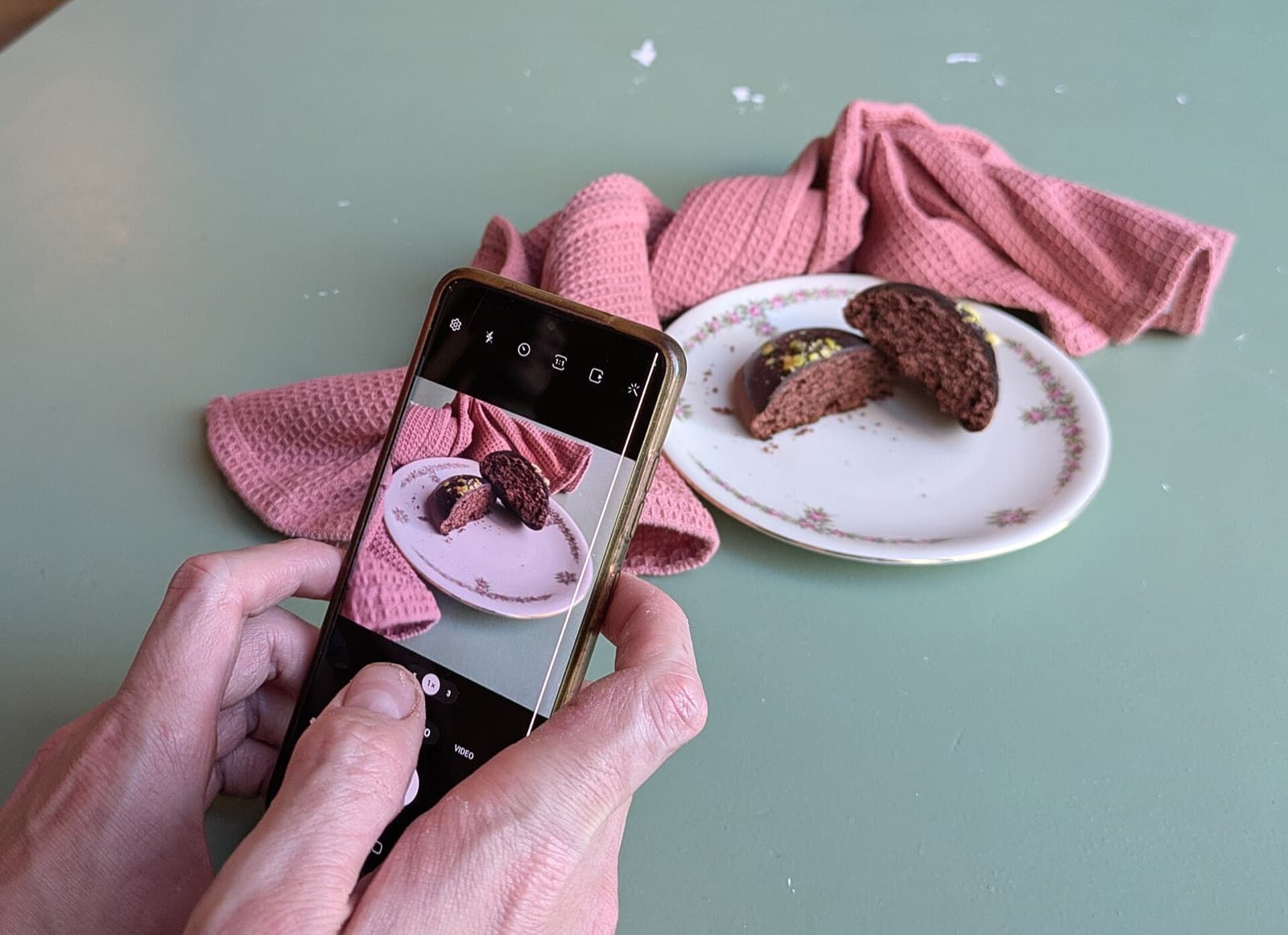
Shoot food next to a window with the overhead lights off, hold the phone still, fill the frame with the plate, capture one motion per clip, keep clips around 15 seconds, and record the real sound of the kitchen instead of posting silence.
| Setting | Practical notes |
|---|---|
| Light | Next to a window, overhead lights off, light from the side; side light shows texture, overhead bulbs turn everything orange |
| Angle | Straight down for bowls and pizza, 45 degrees for burgers and tall things, eye level for drinks; show what makes the dish look like itself |
| Plating | Wipe the rim, use the plate you serve on, put a fork in frame for scale |
| Motion | One motion per clip (a pour, a pull, a cut); start recording early and stop late |
| Length | 15 seconds covers one motion; a second thing is a second post |
| Sound | Record the real sizzle and add music inside the app if you want it; Meta says muted reels are made less visible, and TikTok lists sounds among its video information |
Three takes, then stop.
How do posts turn into orders?
Posts turn into orders when the path from post to menu is one tap and you can count it: your own order link in the bio, an order button where the platform allows your URL, a social-only discount code, and Google posts carrying the same link.
Link in bio. One link, to your own ordering page, not a marketplace listing. Place a test order from your own phone once a month. Say "link in bio" only on offer and nudge days.
Order button or link. Instagram, Facebook, and Google each have a place for an ordering URL; use your own wherever the platform allows it. The click paths are in how to add an order button on Google, Instagram, and Facebook.
A social-only code. A code that appears only in social posts, never in email or on the counter, makes every redemption a social order by definition. Rotate it monthly (SOCIAL10 in October, SOCIAL11 in November). Give email its own code; the restaurant email templates post covers that side.
Google Business Profile posts. Free, per Google, on Search and Maps, and the Offers type carries a coupon code and a link. Post the weekly offer every Sunday with a date range. The rest of the profile is in local SEO for restaurants.
The wider playbook is in how to get more direct orders for your restaurant, and restaurant marketing trends for 2026 covers the other channels.
The 20-minute daily routine and monthly review
The routine:
- Minutes 0 to 5, shoot. Read today's calendar row before service. Shoot the one thing, three takes at most.
- Minutes 5 to 10, post. Caption from the copy column, dish and neighborhood named, "link in bio" on offer and nudge days.
- Minutes 10 to 15, reply. Answer every comment and DM from the last 24 hours; Meta counts a viewer's history with an account as a ranking signal.
- Minutes 15 to 20, bank one. Shoot a spare clip for the day you will not have time.
- Sunday, 10 extra minutes. Copy the week's offer to a Google Business Profile Offers post with the code, the link, and a date range.
Review once a month, not daily.
| Line | What to write down |
|---|---|
| Posts published | The number out of 30, from your grid and story archive, and which days you skipped |
| Reach, if the app shows it | Top three posts by the numbers under each post, and their themes |
| Orders with the social code | Redemptions from your ordering system's discount report, sales on those orders, average ticket |
| What to repeat | The two themes with the most reach and the offer with the most redemptions; give them extra days next month |
Example, round numbers: 27 posts, 23 code redemptions, $32 average ticket, about $736 traced to social. If the top two posts were pull shots, next month gets two more.
Where DirectOrders fits
DirectOrders gives an independent restaurant a branded website with commission-free online ordering, so the link in your bio and the URL in your Google post point at a page you own. Orders from that link land alongside your other ordering channels, 15 and counting, including Voice AI phone orders, and the customer data stays with you. It works alongside Toast, Square, Clover, Lightspeed, and Revel. Pro is $249 a month, Pro + Voice is $349 a month with 500 AI phone minutes included, with a 14-day free trial.
Sources
- Instagram ranking explained, Meta, published May 31, 2023, checked September 2026.
- How TikTok recommends videos #ForYou, TikTok Newsroom, published June 18, 2020, checked September 2026.
- Create posts on Google, Google Business Profile Help, checked September 2026.
- Google Business Profile, Google, states creating a profile is free, checked September 2026.
Bottom line
Post what already happens in your restaurant, one thing a day, and let the calendar decide what to shoot. Take the platforms at their word: interaction and clean video on Instagram, captions and sounds on TikTok, a dated offer on Google. Put your own order link in the bio, give social its own code, and count the orders at month end.
Frequently Asked Questions
The calendar in this guide assumes one post a day, because that is what 20 minutes supports and because a daily habit is easier to keep than a weekly plan. Neither Meta's ranking explainer nor TikTok's names a posting frequency. If daily is too much, keep the theme order and post every other day; the same calendar then covers two months instead of one.
Related resources
Related Articles
How to Add an Order Button to Google, Instagram and Facebook
Exact click paths to add your own ordering link on Google Business Profile, Instagram and Facebook, set it as preferred, and remove DoorDash or Grubhub links.
Pankaj Avhad
AI Search
Voice
First-party
Loyalty
Restaurant Marketing Trends 2026 and 2027: 5 Channels That Work
The 5 restaurant marketing channels that still work in 2027, scored: Google profiles supply 45.2% of AI restaurant citations, and texting rules changed again.
Pankaj Avhad
Your Restaurant
Competitor A
Local SEO for Restaurants: Rank Higher and Get More Orders
A practical guide to local SEO for restaurants. Optimize your Google Business Profile, rank for local keywords, manage reviews, and get found by AI search engines.
Pankaj Avhad